Interactive routing that pushes existing tracks out of the way instead of stopping at them, differential pairs, an N-layer stackup, zone pours with thermal reliefs, and design rules checking that runs the same whether the agent asked for it or you did.
macOS, Windows and Linux · no account. Every platform.
The board
01
Layers, a Properties panel and a Violations tab sit in the same window as the canvas — nothing about the state of the board is hidden behind a menu you have to go find.
Up close
02
DRC runs against the layout as it stands and drops its markers directly onto the copper — the exclamation mark sits on the pad or track that triggered it, not in a separate list you have to cross-reference back to the canvas. Reference designators, pad numbers and footprint names stay printed at every zoom level most routing happens at, so a track can be checked against its part without a hover tooltip in the way.
See what it exports →Routing and copper
03
Dragging a track into another one pushes the track in the way rather than stopping the drag — the standard interactive-router behaviour, not a simplified version of it.
A pair is routed and kept together as a pair, with the length and gap tools that differential routing needs rather than two single-ended tracks that happen to be parallel.
The stackup is not fixed at two layers — set it in the board setup and every layer in it is available to route, pour and check.
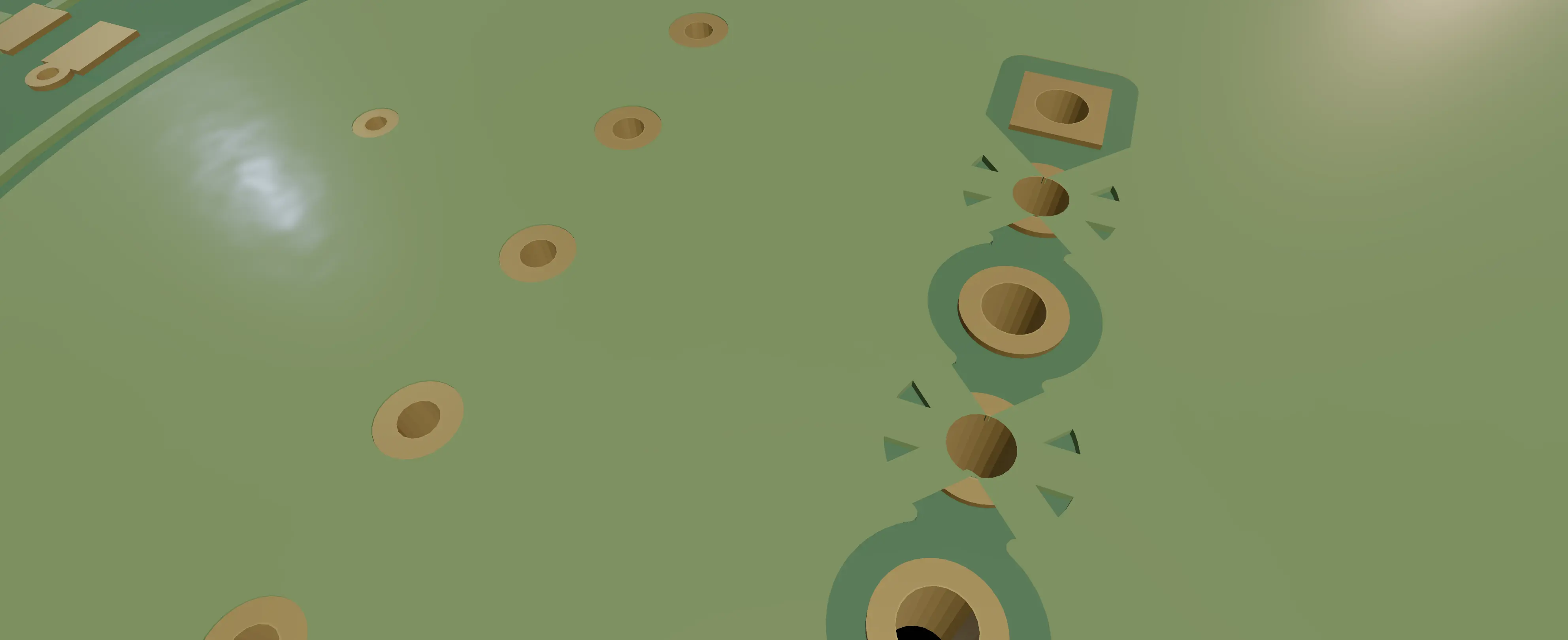
A poured zone connects to a through-hole pad with spokes rather than solid copper, so the joint can still be hand-soldered — the same reason every EDA tool has this option, implemented rather than assumed.
The pour, up close
04
Solid copper around a through-hole pad turns the joint into a heatsink no iron can keep up with, so a poured zone connects through spokes instead — narrow enough to still let the joint heat up, wide enough to carry the net.
What the fab actually gets →macOS, Windows and Linux · no account. Every platform.